
Client data and AI: a practical guide for Pakistani freelancers
A client sends you a spreadsheet and asks for a summary. You could upload it to an AI assistant and finish the first draft quickly. The file also contains customer phone numbers, private notes and a second tab you have not opened.
Before you drag it into the chat window, answer a less exciting question: did the client authorise this information to leave their system and enter that particular tool?
For Pakistani freelancers working with overseas businesses, I would make that question part of delivery. Being trusted with CRM access does not automatically mean you should copy its contents into your own AI account. A paid subscription does not settle the question either.
This guide covers client data privacy when using AI, from the first permission request to deleting working copies and removing a subcontractor's access. It is an operational guide, not legal advice. Ask the client's authorised owner or adviser to resolve contractual, industry and jurisdiction-specific requirements.
If you are building an AI receptionist, the production tests and human handover guide covers whether the system works. This article starts earlier: what information you may give it in the first place.
Separate permission to do the work from permission to upload
“Use AI if it helps” is too vague for a customer database. The client may mean brainstorming headlines from a public website. You may mean sending complaint histories to an external model. Those are different decisions.
I would ask for approval against a specific task, dataset and destination. Name the actual product and account type, including any automation platform between you and the model. “ChatGPT” does not tell the client whether you mean a personal chat, their business workspace or an application using the API.
Check the existing agreement and the client's approved-tool policy first. If they prohibit external AI, do not upload a sample while waiting for an exception. A project manager's casual reply should not override a restriction they lack authority to change.
The following permission request is an illustrative editorial template, not a legal clause. Replace the brackets with verified facts before sending it:
“For [deliverable], I propose using [product, workspace or API project] to process [specific fields]. I will exclude [identifiers and other unnecessary information]. Access will be limited to [named people]. Working copies will be removed at [agreed event or date], subject to the provider's documented retention and exceptions. Please confirm whether this use is permitted and who can approve it. I will use the agreed non-AI route until approval is recorded.”
Attach the relevant vendor policy, not a screenshot saying “secure”. Record the approval where the project team can find it. If the client approves redacted support messages, that does not approve raw call recordings later.
Client approval is also not proof that every underlying permission has been obtained. Ask the client to confirm that they can authorise the proposed use and have addressed any necessary notices or permissions. Do not promise that an email reply makes a restricted dataset safe to process.
Decide what must stay out before choosing a model
I would start with a simple working rule: use public material or invented examples whenever they can answer the question. Keep credentials out of prompts altogether. An API key, password, session cookie or recovery code is access, not useful background context.
Customer records, unpublished financial figures and confidential strategy need more care than a public service description. Health information, identity documents, employee disputes and similarly sensitive material deserve a deliberate client review before you consider an external tool.
“Anonymised” should not mean “I removed the name”. A job title, small town, exact appointment date and unusual complaint can still identify somebody. Even information with no person attached can expose a business secret.
For an illustrative editorial example, imagine drafting a reply to a delayed installation complaint. The model may need the problem, the approved remedy and the tone. It probably does not need the customer's address, payment reference, full order history or the original email signature.
If the task genuinely requires identifiable information, stop using the redacted-data approval as cover. Obtain explicit approval for those fields and an appropriate environment. If either is missing, work inside the client's existing process without that AI upload.
Check the workspace, not just the subscription name
OpenAI says it does not use inputs or outputs from ChatGPT Business, ChatGPT Enterprise or its API to train models by default. Its business data policy also describes explicit opt-in sharing for the API. That is useful, but it answers the training question, not every storage or access question.
I would prefer a client-owned workspace when the client can provide one. They can retain control when the engagement ends, and you avoid mixing several clients into a personal account. Still check which workspace is selected before uploading. Paying for a seat does not make every account you can switch into the approved destination.
Have the workspace owner confirm who can access the material, what sharing is allowed, which apps or connectors are enabled and what deletion controls the chosen plan provides. Verify the controls in that account rather than assuming an Enterprise feature exists on every business plan.
Use individual accounts and multi-factor authentication where supported. Do not share one login with a subcontractor. Review project membership and shared links, and avoid putting several clients' files into one reusable knowledge collection.
Connected tools deserve a separate approval. A chat may be approved while its connection to a personal Drive folder is not. If an assistant can search a whole mailbox, a carefully worded prompt asking it to read one email is weaker than restricting its actual access.
Keep a small approval record. As an illustrative editorial template, its fields could be: client, task, approved data categories, product and plan, account owner, permitted users, connected services, retention reference, approval date and review trigger. Revisit it when the tool, dataset or team changes.
Your own computer belongs in this review. Use a protected work account, lock the screen and keep the device updated. Check whether a downloads folder automatically syncs into a personal cloud account. A file can leave the approved environment before you ever reach the AI upload button. Browser extensions and clipboard utilities also deserve scrutiny if they can read the material you handle.
For API work, separate training from retention
An API integration is not automatically a zero-retention integration. OpenAI's API data controls documentation distinguishes abuse-monitoring logs from application state, the information some features retain to perform their job.
The documentation says abuse-monitoring logs may contain prompts and responses and are retained for up to 30 days by default. It also states exceptions where longer retention is required by law or reasonably necessary to protect services or third parties from harm. Do not turn that into an unconditional deletion promise.
Application state has its own rules. The same documentation says Responses API data has a default application-state retention period of 30 days, with response data stored for at least 30 days under the stated default or store=true conditions. Other resources, such as files and vector stores, have their own lifecycles.
Setting store=false is therefore not a statement that nothing exists anywhere. Abuse monitoring, supported features, caching and other documented exceptions still need review. Check the exact endpoint and model configuration your application uses, including features enabled by a framework.
OpenAI's Zero Data Retention and Modified Abuse Monitoring controls require approval and additional requirements. Endpoint and feature limitations still apply. I would not put “zero retention” in a proposal without confirming the client's actual eligibility, enabled settings and supported workflow against that documentation.
Also inspect your own application. A careful API request can still be copied into a web server log, an automation execution history or an error-reporting service. Mask sensitive fields before logging, restrict access and avoid full request-body traces unless the approved troubleshooting process requires them.
Use a separate project or similarly restricted integration boundary for each client where the platform supports it. Store credentials in the application's secret-management facility, not in prompts, source files or shared spreadsheets. Give a subcontractor only the access their task requires.
Follow the data through every service in the route
Suppose a form sends a message into an automation platform, which calls a model and posts a summary into a team chat. That is several places to check, even if the sales page mentions only the model provider.
For each stop, identify the information received, the people who can read it and the deletion route. Include webhook histories, retries, failure queues and exported reports. Ask whether a support ticket could attach a full payload.
OpenAI explicitly says data sent to remote MCP servers and other third-party services is subject to those services' retention policies in its API data controls guide. Its controls cannot stand in for a review of an outside connector.
If you use Claude instead, read the commercial policy for that product rather than copying OpenAI's wording. Anthropic's commercial retention guidance says ordinary API inputs and outputs are deleted from its backend within 30 days, with exceptions including services with longer retention, separate agreements, policy enforcement and legal requirements.
That guidance also distinguishes saved commercial conversations from ordinary API requests and describes additional safety-related retention. It is not a consumer-plan policy or a guarantee that all Claude-related data disappears after a chat is closed.
You do not need to become a procurement department. You do need to be able to explain where the client's information goes. If a wrapper cannot explain its storage and downstream providers clearly enough for the client to approve, choose another route.
Prepare a smaller input before opening the chat
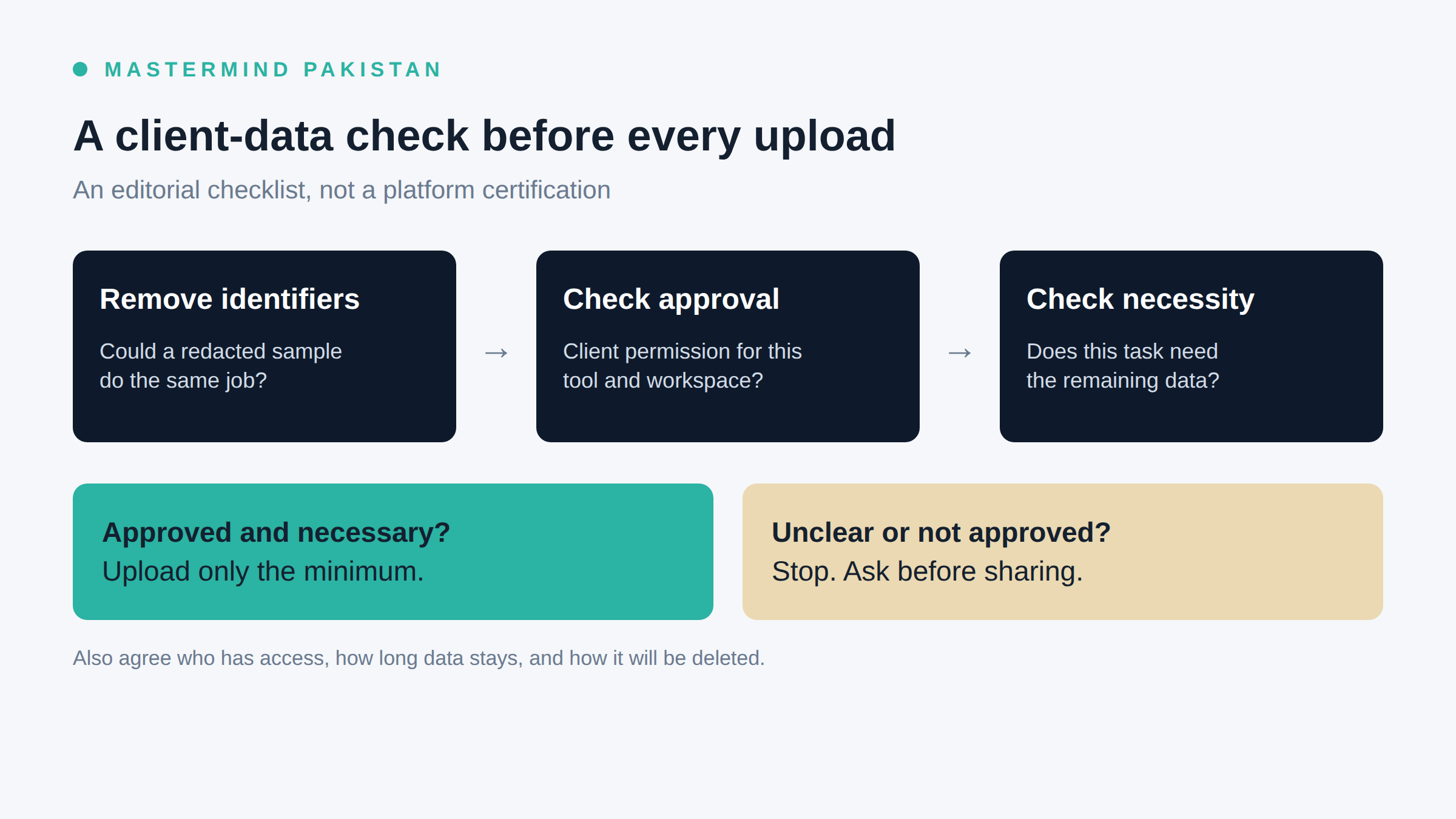
Minimisation works best before upload. Asking the model to remove personal information after uploading the original has already sent that information to the service.
Make a separate working copy inside the approved environment. Remove unused columns and rows. Open hidden sheets, check comments and inspect free-text fields. For documents, look for tracked changes, signatures and embedded attachments. Screenshots can expose browser tabs, notifications and account details around the thing you meant to show.
Here is an illustrative editorial transformation, using invented information:
| Original type of information | What the task may actually need |
|---|---|
| Customer name, email and telephone | A neutral label such as Customer A, or no label |
| Full complaint thread with signatures | The relevant complaint and approved response policy |
| Complete CRM export | Only the fields and records needed for the analysis |
| Production database error with credentials | A sanitised error and a minimal invented reproduction |
Keep any mapping between labels and real people separately, in the client's approved storage. Do not attach the mapping “for context”. Replacing names with labels reduces exposure, but it does not necessarily make the remaining data anonymous.
Sometimes aggregation is enough. If the question is which complaint category needs attention, counts by category may be more useful than individual messages. Suppress unnecessary detail in very small groups where someone could still recognise a person.
Check the output too. A summary can carry sensitive information from the input, and a model can invent identifying details. Review it before sending it into a larger channel or including it in a deliverable. The final report needs an approved audience just as the source file does.
Agree a retention schedule you can actually carry out
“We delete everything when the project ends” sounds reassuring until somebody asks about backups or the client's own archive. Separate the copies you control from vendor retention and records the client intends to keep.
For your working files, agree an event or date that triggers deletion and name the person responsible. For vendor-held data, record the applicable policy and any configured controls. For backups, document the expiry or deletion limitation rather than claiming instant erasure you cannot verify.
The following is an illustrative editorial retention schedule, not a provider promise or recommended legal retention period:
- Keep the source records in the client's approved system under the client's existing rules.
- Remove the freelancer's temporary export after the client accepts the analysis, unless a specific extension is approved.
- Delete uploaded files, saved conversations and retrieval resources through their respective controls when the approved task no longer needs them.
- Retain the approved final report in the agreed destination, with its own audience and review date.
- Record deletion actions and unresolved provider or backup limitations without reproducing the sensitive content in the deletion record.
Deleting a visible chat is not evidence that every backend copy has already disappeared. For example, Anthropic's commercial guidance distinguishes immediate removal from chat history from backend deletion within 30 days, subject to its exceptions.
I would assign cleanup while agreeing scope, not after the final invoice. If a resource must be kept for continuing support, record why, who owns it and when that decision will be reviewed. “Might be useful later” is a poor reason to keep a customer export on a laptop.
Give subcontractors a narrower handoff
Bringing in a developer or virtual assistant changes who can see the data. Confirm that the client permits the subcontractor and the proposed access before sharing anything. Your own access should not silently become permission for everyone helping you.
Give them a task-specific folder, named account or restricted project where available. Explain which AI tools are approved and which material must not leave the workspace. Do not let a deadline turn into permission to upload a file to their personal assistant.
This handoff message is an illustrative editorial template:
“Use [approved workspace] for [defined task]. You may access [specific files or fields]. Do not copy the material into another AI account, connect additional apps or involve another person without approval. Report unexpected access or accidental uploads to [contact]. At completion, remove permitted local working copies and confirm which resources remain.”
Ask the subcontractor to acknowledge the instruction. Keep the actual access permissions consistent with it. A message saying “only this folder” is unconvincing if their account can browse the whole client drive.
At handoff completion, remove temporary memberships and links, revoke unnecessary credentials and verify that the client retains ownership of the deliverables and running integrations. Rotate shared secrets if they were exposed or the access arrangement requires it. Do not break a live client workflow by deleting its only authorised credential without arranging a replacement.
If the wrong file was uploaded, stop the spread
Pause the affected workflow. Restrict exposed links or access, and tell the agreed client contact promptly through the incident route. Identify what was sent, where it went, when it happened and which people or systems may have accessed it.
Preserve the necessary audit evidence under the client's incident procedure. Coordinate removal of the uploaded content and downstream copies; do not indiscriminately erase logs that the investigation needs. If credentials were included, arrange revocation or rotation immediately with the responsible owner.
Be precise about what you know. “I deleted the chat” is an action. “Nobody could have accessed it” is a conclusion you may not be able to support. Ask the provider about remaining retention where necessary, and let the client's responsible team determine notification and legal obligations.
Before work resumes, fix the cause. That might mean removing export permissions, disabling payload logging or replacing an ambiguous approval with a field-level restriction. I would rather explain a paused task than reassure a client with a deletion claim I cannot substantiate.
The last check before you press upload
I would make the final check boring enough to repeat. Open the prepared file rather than trusting its filename. Confirm the account and workspace on screen. Compare the data with the recorded approval, including any remaining identifiers. Check that no unexpected app or external destination is involved.
Then ask whether a smaller excerpt would do the job. If you cannot explain why a field is needed, leave it out. If the client's approver is offline because their working day has ended, wait or continue with approved synthetic material. A time-zone gap is not permission.
After the task, put the reviewed output in the agreed destination and schedule the cleanup you promised. That gives the client a concrete process to approve instead of a vague assurance that you are careful with AI.
FAQ
Can Pakistani freelancers use ChatGPT for client work?
Yes, where the task and data use are authorised and the chosen environment meets the client's requirements. Start with public or invented material. Obtain specific approval before sending confidential client information to an external tool.
Is a paid AI account enough to protect client data?
No. Verify the product, workspace, sharing settings, connected services and retention behaviour. A subscription receipt does not establish client permission or prove that a particular control is enabled.
Does “not used for training” mean nothing is stored?
No. Training and retention are different. OpenAI's API documentation separately describes abuse-monitoring logs and application state. Check the relevant endpoint and features instead of treating a no-training default as a deletion guarantee.
Can I upload a file if I remove names and phone numbers?
Not automatically. Other details may identify someone, and commercial information can remain confidential. Minimise first, then confirm the remaining content and intended tool are within the client's approval.
What if the client will not approve AI use?
Use the agreed non-AI workflow or discuss a narrower task using public or synthetic material. If that changes delivery effort, resolve the scope with the client. Do not conceal the upload to preserve your original estimate.
What should I keep after deleting the working data?
Keep the agreed deliverable and a minimal record of approval and cleanup in the authorised location. Record outstanding retention limitations honestly. Avoid retaining the original sensitive payload merely to prove that you deleted another copy.
