
Your $150 AI receptionist can lose money before the first phone bill
You see a $97 software plan. You decide to sell it for $150 a month.
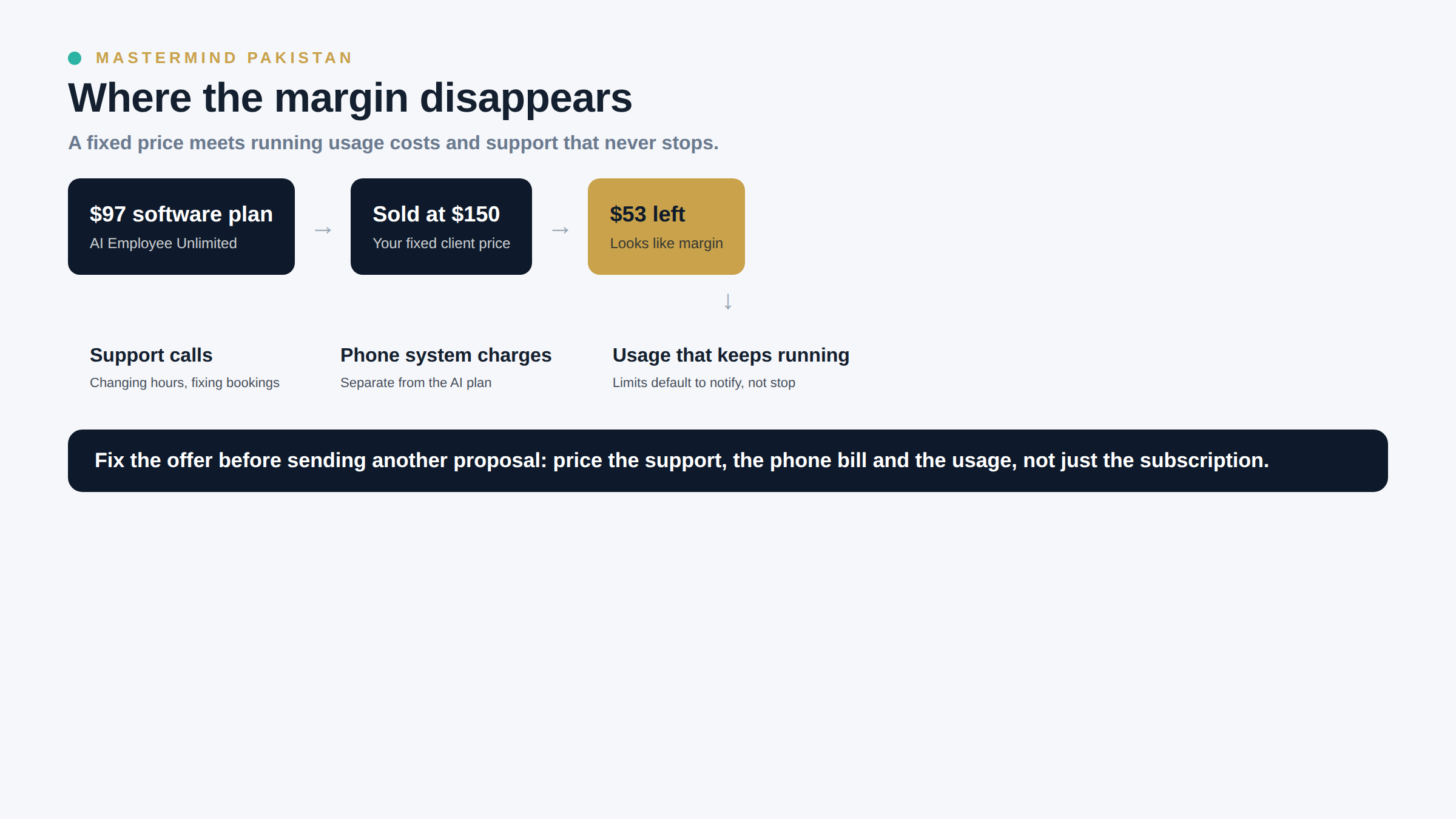
There is $53 left. That looks like a margin until the client asks you to change the opening hours, fix a failed booking and explain why their phone bill increased.
I would not quote an AI receptionist by adding a little money to the subscription price. Especially if I were a freelancer in Pakistan selling to a business overseas, with dollar software costs and an owner who expects someone to answer when the system breaks.
HighLevel's current documentation gives us a specific reason to revisit these offers. Its AI pricing page, updated on 28 September 2026, lists AI Employee Growth at $50 per enabled location per month and AI Employee Unlimited at $97. The Unlimited plan includes supported Voice AI usage, subject to fair use. Phone System charges remain separate.
There is another detail worth checking immediately. HighLevel's AI Usage Limits guide says spending limits are not configured by default. When you enable a limit, the default behaviour is "Keep AI running, just notify" unless you change it.
A number labelled as a limit can therefore be an alert threshold rather than an instruction to stop.
That combination can hurt a small agency: a fixed client price, misunderstood usage costs and an automation that keeps running. I would fix the offer before sending another proposal.
What the $97 actually covers
The word "Unlimited" belongs to a particular vendor plan. It does not describe everything your business must deliver.
According to HighLevel's current pricing and rebilling guides, AI Employee Unlimited includes supported inbound, outbound and widget Voice AI, subject to fair use. That matters because older explanations of these products may no longer match what you can buy today.
However, the telephone service still has its own charges. Text charges are separate too. Agent Studio remains pay-per-use across the AI plans. You should not assume that every feature with "AI" in its name is included in a $97 subscription.
Growth has different allowances. The current documentation lists 100 Voice AI minutes and 1,000 Conversation AI agent responses each month. The 100 voice minutes are shared across inbound, outbound and widget usage. They are not 100 minutes for each channel.
Those are vendor allowances, not a recommendation that Growth will suit your client.
Before quoting, I would open the actual account and check the selected plan against the pricing documentation. I would also write down which products the proposed workflow uses. A receptionist built around Voice AI is different from a workflow that calls Agent Studio or another paid service.
Do not copy a pricing screenshot from a tutorial and treat it as your cost sheet.
Put your own time in the calculation
Here is a hypothetical monthly delivery budget for one client. These are planning assumptions, not published market rates or results from a Mastermind member.
| Item | Monthly assumption |
|---|---|
| AI Employee Unlimited for one enabled location | $97 |
| Share of the agency platform subscription | $30 |
| Three hours of support and review at $20 per hour | $60 |
| Other delivery costs and payment fee allowance | $15 |
| Total before separately billed usage | $202 |
At a $150 service fee, this model loses $52 before acquisition costs, taxes or additional overhead. It also assumes the client pays the separate metered charges. If you absorb those, the position gets worse.
At $350, the same model leaves $148, roughly 42% of the service fee, before those other costs. I would call that contribution under the stated assumptions, not net profit. The budget already includes an allocation of the agency subscription, but it does not include every expense of running a business.
The $30 allocation is a placeholder. Divide your actual agency subscription across a defensible number of paying clients. If you have one client, do not spread the bill across ten clients you hope to sign.
The $15 allowance also needs replacing with actual costs. Payment collection can cost more or less depending on how you collect, convert and withdraw the money. A dollar price on a proposal does not guarantee that the same number reaches your account.
For a Pakistani operator paying some expenses in rupees and buying software in dollars, I would keep the delivery budget in the billing currency first. Then record the rupees actually received and the fees paid. An assumed exchange rate should not hide a weak offer.
Now change the support assumption. If the account takes eight hours rather than three, at the same $20 hourly labour cost, delivery costs become $302. The $350 fee leaves $48.
You have not changed the software. You have changed how much of your week the client consumes.
Sell one job the owner already understands
"AI employee for your business" invites a very large list of expectations.
I would start with a narrower job: an after-hours inbound receptionist for one location of a home services business. It answers approved questions, captures a request and offers an appointment only when the agreed calendar rules allow it.
That is a proposed offer, not a claim that this setup has produced a particular result.
The scope needs to say what happens when a caller asks for something outside that job. A request for a discount should go to a person. So should an angry customer disputing an invoice. Emergency situations need an explicitly agreed escalation path, not a confident answer generated from a vague prompt.
I would avoid letting the first version make binding quotes. Service prices often depend on information the caller has not supplied. The agent can record the request and explain that a team member must confirm the price.
One location and one calendar also make testing manageable. If the prospect needs several branches, different service areas and different booking rules, quote that work separately. A second calendar can introduce a second set of exceptions even when adding it takes only a few clicks.
A useful discovery question is:
"When somebody calls after you close, what happens now, and who checks those enquiries the following morning?"
Ask for the current process before offering a replacement. The owner may already have an answering service that works. In that case, an AI demo alone is a weak reason to change.
A proposal I could explain without hiding the bill
For this worked example, I would test a $600 setup fee and a $350 monthly managed-service fee. These are illustrative prices to evaluate with prospects, not evidence of what every market will pay.
The setup would cover one location, one inbound call flow and one calendar integration. It would include collecting approved business information, configuring the agent and completing an agreed acceptance test before launch.
The monthly fee would include the selected AI subscription in the cost model above, plus a defined allowance for review and minor changes. Telephone, messaging and other excluded usage would be charged separately under the client's written agreement.
I would put this sentence beside the price:
"The monthly service fee is $350. Telephone and messaging charges are additional. We will show you the applicable usage rates and agree who pays them before activation. Extra integrations or changes outside the agreed scope require a separate quote."
Then I would define the support allowance. For example, up to three hours each month for call review, troubleshooting and minor changes to approved information. New workflows and additional locations are excluded. Unused support time does not roll over in this example.
A support allowance needs a practical policy for faults too. Do not use it to charge the client again for correcting your own defective setup. State which defects you fix without an additional fee, what the initial warranty period covers and when a request becomes new work.
At an assumed 12 hours of setup labour costing $20 an hour, the $600 setup fee leaves $360 before other setup expenses, acquisition costs and tax. If discovery shows 30 hours of custom work, the example price needs revisiting before you sign.
Check whether automated rebilling is worth buying
HighLevel distinguishes rebilling usage from reselling an AI subscription. Its current guide says AI Employee usage rebilling requires the $497 monthly agency plan.
That does not mean every freelancer should upgrade to it.
If you are serving one small account, buying a more expensive agency plan purely to pass through a modest usage bill may make the offer less profitable. Price the upgrade against the administrative work it saves and the other features you will genuinely use.
Before promising automatic usage billing, confirm that your agency plan supports it and that the client's billing setup works. Your invoice wording cannot create a payment capability you do not have.
If automated rebilling is unavailable, agree another supported arrangement before launch. That may mean invoicing documented usage manually under your contract. Account ownership and vendor billing permissions will affect the options, so check them rather than improvising after the first charge arrives.
I would keep the service fee and usage line items visibly separate. It makes later conversations much easier when the owner can see whether a higher bill came from more calls or more work requested from you.
Test the spending limit, not just the receptionist
An agent can pass every conversation test and still be configured badly for billing.
HighLevel documents two behaviours when a configured AI usage limit is reached: "Keep AI running, just notify" and "Block AI at the limit". A sub-account's custom configuration can override the agency default.
I would inspect the client's own settings. Looking at the agency default is not enough.
The important distinction is that these are limits on covered billable AI usage. They do not turn into a universal ceiling on telephone charges, monthly subscriptions or every external tool connected to the account.
I would also avoid promising perfect enforcement based solely on the help article. The current guide contains an apparently conflicting note about sub-account billing beyond limits, while its main explanation says alert-only usage continues. Usage reporting can lag. Verify the actual behaviour and ask vendor support to clarify any material ambiguity before guaranteeing a hard financial cap.
For a pilot, choose the policy with the client. A hard stop may protect an AI budget but interrupt the receptionist. Alert-only operation may keep enquiries flowing but needs somebody responsible for reviewing alerts and approving spend.
Neither choice is automatically correct.
Write down what happens if the AI stops. Does the call reach a person? Is there a voicemail fallback? Where does the enquiry appear, and who checks it? Configure and test the chosen route rather than assuming the spending-limit setting creates a fallback for you.
For an overseas client, name the hours during which someone will actually respond to an alert. Your availability in Pakistan may not overlap with the business's busiest period. If nobody covers that window, the offer must not imply continuous human monitoring.
Run a small pilot before promising results
I would use a 14-day pilot after configuration and acceptance testing. Fourteen days is a suggested review period, not proof that every business will generate enough calls to evaluate the system.
Start by documenting the current handling of after-hours enquiries. If there is no reliable baseline, say so. You cannot honestly claim an improvement over a number nobody measured.
My pre-launch test would include an ordinary appointment request and an attempt to book an unavailable slot. I would also test a caller outside the service area, a request for a refund and someone who insists on speaking to a person.
For each test, write the expected behaviour before running it. "The agent sounded natural" is not a pass condition for a booking workflow. "The agent did not offer an unavailable appointment and recorded a callback request" is useful.
During the pilot, review call outcomes using recordings or transcripts only where the client has the necessary permissions and notices in place. Follow applicable privacy and recording requirements. Keep access restricted and agree retention rather than collecting everything indefinitely.
Look for whether legitimate enquiries were captured and whether appointments were valid. Check whether the handoff reached the right person. Count duplicate bookings separately from genuine new appointments.
I would not sell this as "20 extra bookings guaranteed". The volume and quality of enquiries sit partly outside the system's control. A quiet fortnight may tell you very little about commercial value, even if the technical setup behaves correctly.
Also, do not count every appointment as recovered revenue. Some callers would have booked anyway, some will cancel and some will never buy.
What I would say when the owner asks about the $97 plan
A prospect can look up the software price. I would rather make that conversation easy than act as though the number is a secret.
"Yes, the selected AI plan currently costs $97 per location. You can buy the software yourself. My $350 service includes that subscription, the agreed call flow and ongoing review within our support allowance. Phone usage is separate. If you want to manage the setup and monitoring internally, buying directly may be the better option."
That answer forces you to justify the work you are charging for.
If your service consists only of switching on the subscription, a large monthly management fee is difficult to defend. Either provide the management work or offer a setup-only engagement with a clear handover.
I would follow with a demonstration of the buyer's actual process. Show the owner what happens when the calendar is full. Show where a request lands when a human must take over.
A polished voice sample is interesting. A reliable handoff gives the owner a reason to trust the system with a real enquiry.
Review quiet accounts before renewing everything
The gap between the documented Growth and Unlimited subscription prices is $47 per enabled location per month. Across ten locations, that is $470 in subscription differences alone.
That is a scenario to investigate, not a saving to claim automatically.
Moving an account to Growth can introduce overages and different allowances. You also spend time reviewing and changing the configuration, and a poorly timed change could interrupt a service the client depends on.
Before changing anything, inspect a full billing cycle and check every AI product the location uses. A quiet phone line does not prove the account has little Conversation AI usage. Seasonal peaks may make the last month unrepresentative.
Compare the expected total cost under the available plans. Pay-per-use is also an option in HighLevel's current documentation. A low-volume location does not automatically need a subscription just because subscriptions are easier to package.
The same review should catch duplicate tools. If an existing answering service still handles escalations, cancelling it may break the fallback you sold. Check its role before calling its fee waste.
My first action would be to take one current proposal and add the missing cost lines. Then I would replace "unlimited AI receptionist" with the specific job, the usage terms and the human fallback. Do that before making the offer more attractive with a discount.
FAQ
Does AI Employee Unlimited mean unlimited free calls?
No. HighLevel currently includes supported Voice AI usage under the Unlimited subscription, subject to fair use. Phone System charges remain separate. Check the selected product and current account pricing before quoting.
Can I sell this for less than $350?
Yes, if your actual delivery cost and scope support it. The $350 example is a worked budget, not a pricing rule. A setup-only service or a smaller management scope may support a different fee. Leaving your own labour out of the calculation does not make delivery cheaper.
Should I always choose a hard spending limit?
No. Blocking AI can interrupt client operations. Agree whether cost containment or continuity takes priority, define who receives alerts and test the fallback. An AI usage limit also does not cover every category on the account's bill.
Can I promise sales instead of selling software features?
You can frame the offer around the business problem, such as handling after-hours enquiries. Be precise about what you control. Do not guarantee sales without a defensible basis, agreed measurement and clear responsibilities for the client's part of the process.
What if the client wants outbound AI calls too?
Treat that as a separate scope and compliance review. Inbound enquiries do not establish permission for every outbound campaign. Check the destination's requirements, the platform's rules and the client's consent records before enabling outbound activity.
Methodology and sources
This is a researched article, not a workshop transcript or a customer case study. I used HighLevel's official documentation checked on 29 September 2026. The pricing page showed an update dated 28 September, the usage-limits guide 22 September and the rebilling guide 14 September. Those update dates provide current context; they do not establish when every feature first launched.
Sources: AI Product Pricing, AI Usage Limits, and AI Employee: Access, Rebilling and Reselling.
The $150 resale example, $600 setup fee, $350 service fee and delivery budgets are hypothetical. They are not market averages or reported earnings. Calculations were checked separately. Verify live account pricing and relevant legal requirements before implementing the offer.
