Your client's spreadsheet isn't WhatsApp permission
Picture this hypothetical client call. A business owner sends you a spreadsheet of old enquiries and asks for a WhatsApp campaign before the weekend. The numbers are there. Someone has even coloured the promising ones green. You can almost hear the deposit arriving.
Then you ask where those people agreed to receive WhatsApp messages.
The owner points back at the spreadsheet.
I would pause the project there. Not abandon it, and certainly not lecture the client. But a column called "mobile" does not tell you what someone agreed to receive. Neither does a green cell, however confidently it has been coloured.
For a Pakistani freelancer selling WhatsApp automation, this is an uncomfortable moment. You want the work. The client wants movement. Asking about permission can feel like adding friction when another vendor is promising to message the whole list tonight. Still, I would rather explain a smaller eligible audience now than explain unwanted messages later.
The useful service starts with deciding who can receive what. After that come message templates, timing, replies and the person who takes over when the automation should stop.
A client's spreadsheet is a starting point, not permission
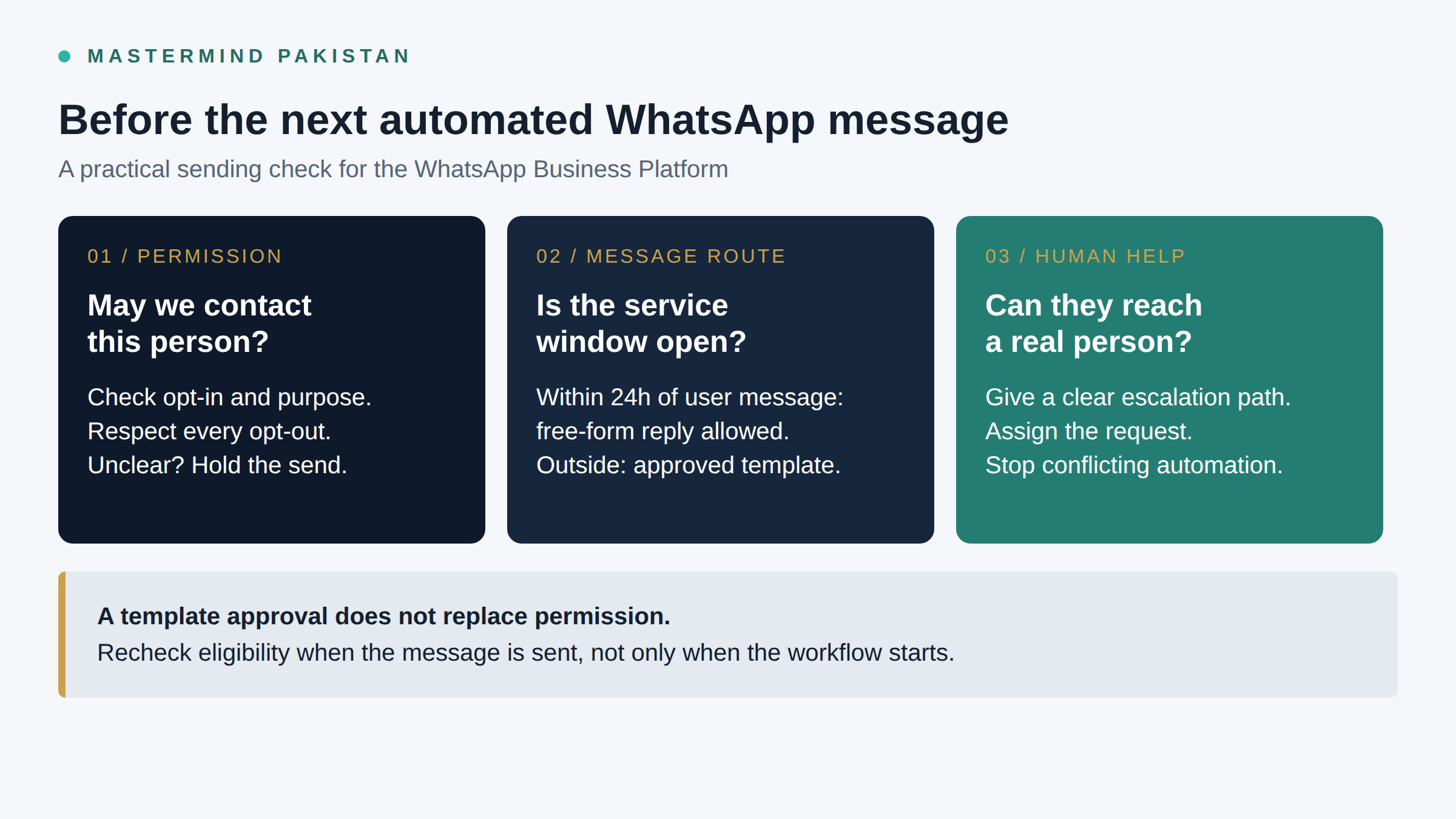
The WhatsApp Business Messaging Policy says you may contact people only if they have given you their mobile number or username and you have received opt-in permission confirming they want subsequent messages or calls from you. Possessing the number satisfies neither condition by itself.
Ask the client to show the collection point. Was it an enquiry form? A checkout? An event registration? What did the person see when they submitted their details? A screenshot of today's form cannot establish the wording someone saw months ago.
I would separate records with evidence of relevant permission from records where that evidence is missing. "Unknown" deserves its own status. It should never quietly become "yes" because a campaign needs more recipients.
A past customer may reasonably expect an update about their order. That does not establish permission for every future promotion. Likewise, someone who asked for a quotation has not necessarily signed up for a weekly sales broadcast. Check the permission and the purpose together.
If you cannot establish permission, leave that record out of outbound WhatsApp automation. Do not send an unsolicited WhatsApp message asking for permission to send unsolicited WhatsApp messages. Improve collection at the next genuine interaction, or consider another independently permitted route. A different channel needs its own justification.
That is a sensible boundary to explain in the proposal. The client supplies evidence; you configure the agreed rules. You cannot manufacture consent retrospectively by importing a file.
Be clear about which WhatsApp product you are selling
The Business App and the Business Platform are distinct products. The messaging policy covers both, but its approved-template and 24-hour customer service window rules appear under the Platform-specific terms. Do not present those terms as a complete instruction manual for the App.
This article's template and window logic concerns the WhatsApp Business Platform, often called the WhatsApp Business API in commercial conversations. Before quoting, ask the provider to identify the product and connection the implementation actually uses.
A demo that sends a message proves very little about that connection. Ask how the system handles approved templates, incoming messages and account restrictions. Ask to see those behaviours in the proposed setup rather than accepting a list of features from a different plan.
I would be wary of anyone selling "unlimited bulk WhatsApp messages" as if permission were a technical inconvenience. WhatsApp says policy violations and significant negative feedback can lead to restrictions or loss of access. An official connection and an approved template do not cancel those enforcement provisions.
If the wider problem is that enquiries disappear between advertising and sales, start with the lead conversion audit guide. Here, the narrower question is whether a particular WhatsApp message should leave the system at all.
Keep permission where the workflow can read it
A consent screenshot sitting in the owner's downloads folder will not stop a scheduled message. The implementation needs a usable record, linked to the right contact and available when the next send is evaluated.
My suggested minimum record is practical rather than a claim about legally required database fields:
- The source of permission, its timestamp and the wording or version shown.
- The business named in that permission and the message purposes it covers.
- The current opt-out status, including requests received outside WhatsApp.
- The latest incoming WhatsApp message timestamp and any human takeover status.
Keep the supporting evidence accessible to authorised staff. A label saying "consented" without a source is difficult to investigate when the recipient asks why you contacted them.
For a hypothetical enquiry form, an optional choice might say: "I agree to receive WhatsApp messages from [business] about this quotation request. I can ask you to stop at any time." Separate optional promotional wording could cover offers, if the business genuinely needs that permission. These are illustrative copy suggestions, not approved templates or a legal sign-off.
WhatsApp's opt-in best practices recommend setting expectations for message categories, obtaining separate category permissions and separate permission to initiate calls. I would keep quotation follow-up and promotional offers distinguishable in the record, even if the first implementation only handles quotations.
Also check the privacy policy and access arrangements. WhatsApp requires necessary notices, permissions and a published privacy policy; it prohibits asking for full payment card numbers, financial account numbers and other sensitive identifiers. For a Pakistani business, that means a full CNIC number should not become a casual bot qualification question. These are platform requirements, not a substitute for advice on applicable Pakistani or overseas law.
The 24-hour window belongs to the customer's message
On the Platform, the customer service window opens and resets with each user message. You can reply without a template within that 24-hour window. Outside it, messages must use approved templates. Business-initiated conversations also require an approved template, according to the Platform-specific policy.
The clock does not restart because your bot sent another nudge. A CRM record being updated is not a new WhatsApp message from the customer either. Those distinctions need to exist in the workflow, not just in the implementer's head.
Consider this hypothetical timeline, with every time shown in Pakistan Standard Time:
- Monday, 10:00 am: the customer messages the business asking about a quotation. The service window opens.
- Monday, 3:00 pm: the business replies. That outgoing reply does not reset the window.
- Monday, 6:00 pm: the customer sends a follow-up question. The window resets from this incoming message.
- Tuesday, 7:00 pm: without another customer message, the business cannot send a free-form follow-up under that window. An eligible follow-up needs an approved template.
Permission still matters outside the window. An approved template supplies an allowed message format; it does not establish that the recipient consented to its purpose.
Check eligibility at send time. A contact may have been eligible when a reminder entered the queue but opted out before it was due. Another may have requested a person, making the automated reminder inappropriate even though the service window remains open.
I would make missing or unreliable state stop the automated send and create a review task. Guessing the timestamp is a poor shortcut. So is turning a failed template send into a free-form message just to get something delivered.
A friendly sales pitch is still a sales pitch
Meta describes utility messages as non-promotional and tied to a user action or request, or critical to the user. Marketing includes offers, promotions and abandoned cart reminders. Those distinctions appear on the official Platform pricing page.
Calling something a "helpful reminder" does not decide its category. Read what the message asks the recipient to do. If it adds a discount or encourages another purchase, do not assume it is utility just because an order number appears at the top.
Here are hypothetical scripts to review, not pre-approved templates:
Requested appointment update: "Your appointment with [business] is booked for [date and time]. Reply if you need help changing it."
Promotional offer: "[Business] has an offer on [service] until [date]. Would you like the details? Reply STOP to stop promotional WhatsApp messages."
The second needs permission appropriate to promotional messages. The first needs a real appointment behind it. Neither should go live with invented variables or without the required template approval where applicable.
Keep the message's purpose stable after approval. WhatsApp says templates must be used for their designated purpose and may be reviewed, paused or rejected at any time. Build an alert for a template that becomes unavailable, with a person responsible for deciding the next step. That follows the risk described in the template policy; the alert itself is an implementation recommendation.
I would also write an ending into the follow-up plan. Silence does not deserve an endless sequence of increasingly cheerful reminders. Decide which events stop it, and what happens when the agreed sequence finishes without a reply.
Let people leave without passing a spelling test
"STOP" is useful because it is easy to explain. It cannot be the only request the team honours. "Please remove my number" means something even when it arrives in a voice note or through a phone call.
The policy requires honouring opt-outs made on or off WhatsApp, including removing the person from the contacts list. The business needs a way for staff to record those requests, not just a keyword trigger in one inbox.
I would design the workflow so an opt-out prevents the relevant queued messages from going out. If the request is broad, stop WhatsApp outreach rather than interpreting it as narrowly as possible. An ambiguous request should reach a person while promotional sends remain paused.
Do not make an AI model the sole judge of whether someone sounded serious enough. Staff need a direct suppression control. If AI helps identify language variations, test it, and provide a route for anything it cannot interpret confidently.
Reimports deserve special attention. A fresh spreadsheet should not resurrect a suppressed contact because the new row lacks the old stop flag. Agree how the business removes the person from messaging contacts while maintaining the minimum lawful suppression record needed to prevent recontact.
Test this with controlled contacts: opt out, queue a later message, then repeat the import. The expected result is no further prohibited outreach. A beautiful confirmation message means very little if tomorrow's campaign ignores the request.
"A person will help" needs an actual person
WhatsApp permits automation when responding during the service window, but requires prompt, clear and direct escalation paths. Its policy examples include an in-chat human transfer, phone, email and web support. It does not say every business must offer every route.
I would choose a route the client can genuinely operate. A handover button connected to an inbox nobody checks is decoration.
For a hypothetical quotation assistant, a customer asking for a person should pause automated sales follow-up and create a visible assignment. The assignee needs the conversation and the reason for escalation. The customer needs an honest explanation of what happens next.
A hypothetical out-of-hours response might say: "Our team is offline now. Your request is waiting for the quotation team, who return at [time and timezone]. You can also contact us at [staffed support route]." Only use that wording if the assignment exists and the stated coverage is real.
For teams delivering from Pakistan to overseas clients, "tomorrow morning" is too vague. State whose morning. Do not sell round-the-clock human support because the bot can stay online.
Agree what happens when the assigned person does not respond. Someone needs to receive the overdue task, and the bot must not quietly resume pitching while the customer waits. Verify these behaviours in the chosen system; do not assume that a vendor's phrase "human handover" includes your required fallback.
My preference is to limit the assistant's authority as well. It can collect an ordinary quotation detail without being allowed to invent a discount, approve a refund or promise availability. Sensitive or disputed requests should leave the sales sequence and reach someone authorised to decide.
Quote for a bounded implementation, not a magical inbox
If you are selling WhatsApp automation in Pakistan, a tighter offer can sound less exciting than "AI handles everything". I would still choose it. The buyer can understand what they receive, and you can demonstrate whether it works.
Here is a hypothetical package description, not a current Mastermind service or a vendor offer:
We will configure consent-aware WhatsApp quotation follow-up for one enquiry source and one business number on the agreed Platform connection. The scope includes permission records, up to two message templates submitted for approval, send-time window checks, opt-out handling and one staffed escalation route. We will test the agreed failure cases and hand over operating instructions.
Submission is a deliverable you can control. Template approval is not. Make that distinction explicit, along with access dependencies and who approves message wording.
The client should supply the permission evidence, authorised business access and the person who handles replies. Exclude cold-list broadcasting, unsupported account recovery and promises of sales results. More lead sources, languages or workflows should require a scope decision rather than becoming free additions halfway through.
Keep implementation fees separate from usage costs. Meta's pricing page says Platform charges are based on delivered messages, recipient market and category. It lists marketing, utility, authentication and service categories, and says service messages within the customer service window are free of Meta's messaging charge.
That does not make the whole operation free. Ask the selected provider to itemise any subscription, inbox, CRM, AI or support charges it applies. Obtain a current quote for the expected recipient markets and message mix rather than copying a supposed universal Pakistan price into your proposal.
A Pakistan-based team serving customers elsewhere should not budget solely by where its own office sits. Nor should it assume every contact will receive the same number of paid messages. Customer replies, opt-outs and the approved follow-up design change the estimate.
Make the awkward cases part of acceptance
Before activation, use authorised test contacts to demonstrate more than the happy path. The following are suggested acceptance checks, not results from a deployed system:
- A record with missing permission evidence cannot enter outbound messaging.
- A queued message rechecks permission and the latest customer-message time before sending.
- An expired window requires the appropriate approved template; an unavailable template stops the send.
- A stop request blocks relevant follow-up, including after a later import.
- A human request creates an assignment and pauses the automated sales sequence.
- An unavailable assignee triggers the agreed fallback without a false promise to the customer.
Keep evidence of what actually happened. A workflow tick is not proof that the right person received the assignment. Inspect the contact state and the receiving inbox together.
Give the client a usable pause control and a named owner for template failures, unexpected messages and complaints. If nobody is willing to own those jobs, I would delay activation. That is a staffing problem the automation cannot politely solve.
The best next step may be fixing the form and leaving the old spreadsheet alone. That can feel disappointing when everyone wanted a campaign. I think it is a much more defensible piece of work to put your name on.
Frequently asked questions
Can I send bulk WhatsApp messages to a client's existing leads?
Only where the recipients and messages meet the relevant permission, policy and legal requirements. Being in a client database is not enough. Check what people agreed to receive, honour opt-outs and apply the Platform template rules where you use the Platform.
Does an approved template replace WhatsApp opt-in?
No. Approval concerns the template. You still need the recipient's relevant permission, and you must use the template for its designated purpose. A technically accepted send is not evidence of consent.
Does every outgoing message restart the 24-hour window?
No. The Platform customer service window opens and resets with each user message. Your outgoing acknowledgement or follow-up does not reset it. Check the latest incoming message before choosing the permitted send format.
Can a WhatsApp bot handle all enquiries without human support?
I would not sell that promise. WhatsApp requires clear, direct escalation paths for automation during the service window. Choose a route the business can staff, state its availability honestly and test what happens when nobody answers the first assignment.
Can I guarantee that the account will never be restricted?
No. WhatsApp retains enforcement powers, including restrictions linked to policy violations and negative feedback. Promise the implementation and checks you control, not immunity from enforcement or guaranteed conversions.
What should I do with numbers whose permission is unclear?
Keep them out of outbound WhatsApp automation until relevant permission is established. Repair the collection process for future enquiries. Ask the client for evidence rather than treating an empty consent field as an invitation to send.
